GBS SE Agent follows the same design as the best-known coding agents: one tool-calling loop over an append-only conversation, a small set of precise tools, subagents for research that would flood the context, and a UI that shows every step. It is a VS Code extension written in TypeScript with no runtime dependencies.
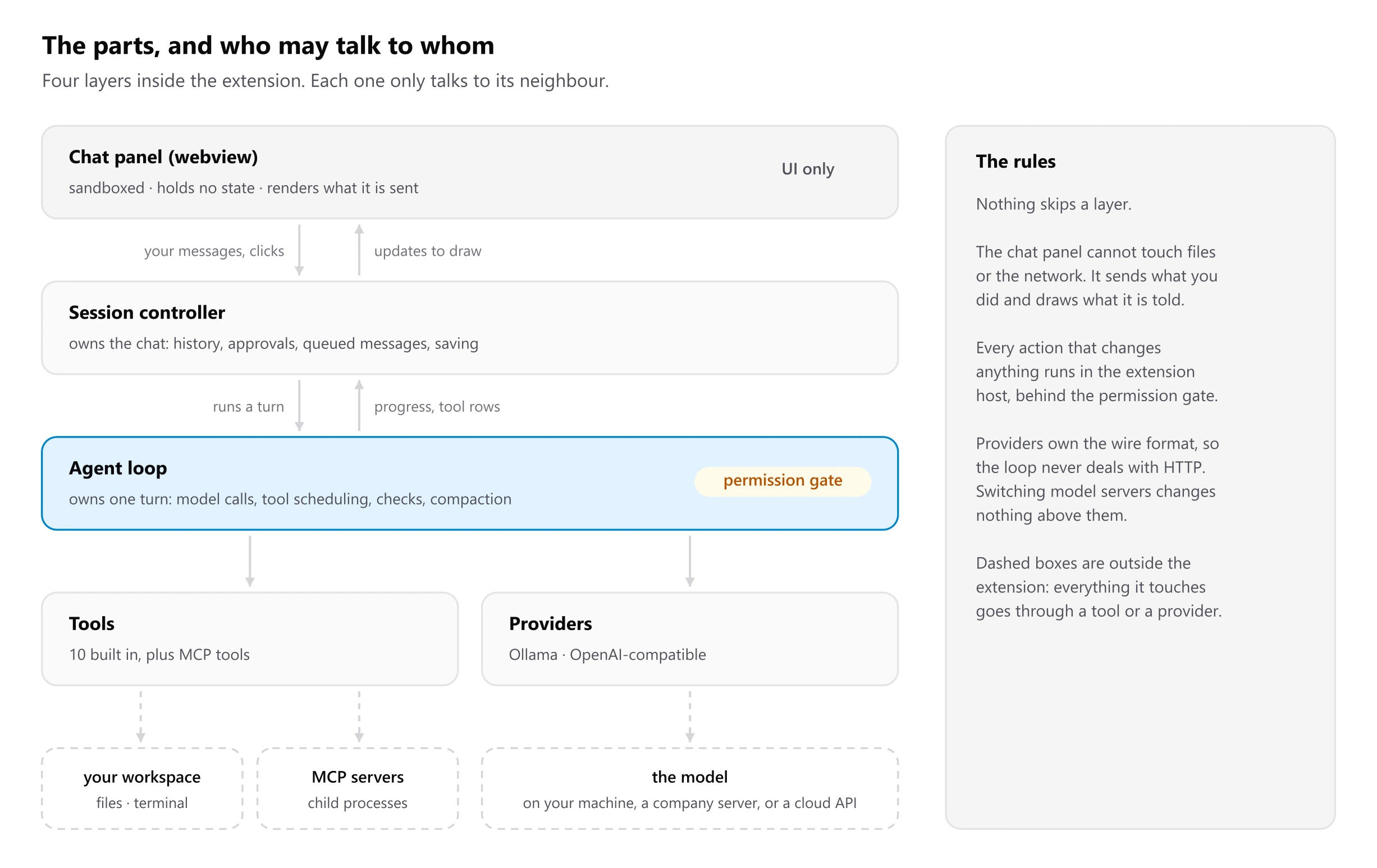
The layers
| Layer | Owns | Never does |
|---|---|---|
Chat panel (media/chat.js) | Drawing the transcript, cards, approvals and composer | Touch files, the network, or any state that must survive a reload |
Session controller (src/session/controller.ts) | The active chat: history, queued messages, approvals, usage, the per-turn file summary, saving | Talk to a model directly |
Agent loop (src/agent/agent.ts) | One turn: calling the model, scheduling tools, the permission gate, diagnostics, compaction | Know which model server is on the other end |
| Tools and providers | The actions (src/agent/tools/*, src/mcp/*) and the wire formats (src/llm/*) | Decide what to do next |
The webview is sandboxed with a strict content security policy. It sends
intents (send, stop, approve, openDiff, …) and receives a full init
followed by small patch messages, batched every 40 ms so streaming stays
smooth.
A request, end to end
- You send a message. The controller adds the open file and any
@mentions, and loads the skills and MCP tools for this run. - It starts a turn: the agent loop calls the model with the system prompt, the tool schemas and the conversation.
- Every tool call the model asks for passes the permission gate, then runs. Read-only calls run in parallel; anything that changes files runs in order.
- After edits, the loop collects language-server errors for the changed files and adds them to the results.
- Results are appended and the model is called again, until it answers without asking for a tool or the step budget runs out.
- The controller writes the turn summary: time, tokens, every changed file, with diff and undo.
One turn, start to finish follows the loop in detail.
Where to look in the source
| File | What lives there |
|---|---|
src/agent/agent.ts | The loop, parallel tool batches, approvals, repeat detection, diagnostics, continuation after a cut-off answer |
src/agent/prompts.ts | System prompts and the cached environment block (OS, shell, project profile, git branch, AGENTS.md) |
src/agent/compaction.ts | Token estimates, eliding old tool output, summarising, repairing interrupted tool calls |
src/agent/permissions.ts | Permission modes, the safe-command list, sensitive paths, "always allow" rules |
src/agent/tools/* | The built-in tools |
src/agent/workspace.ts | Workspace containment, editor-aware reads and writes, version tokens |
src/agent/snapshots.ts | Pre-edit file contents for the diff view and undo |
src/skills/* | Skill discovery, front matter, the catalogue line per skill |
src/mcp/* | MCP config, the stdio client, server lifecycle, the tool adapter |
src/llm/* | Ollama and OpenAI-compatible providers, retries, the text tool protocol |
src/session/controller.ts | Turns, queued messages, UI batching, consent prompts |
src/ui/chatViewProvider.ts | The webview host and its content security policy |
The code is at gramproindia/agent. The rest of this section covers the loop and tools, context and cost, permissions and security, skills and MCP internals and providers.