A skill is a folder with a SKILL.md that teaches the agent something specific
to your team or project: how to use your component library, the conventions of
one service, the rules of a domain.
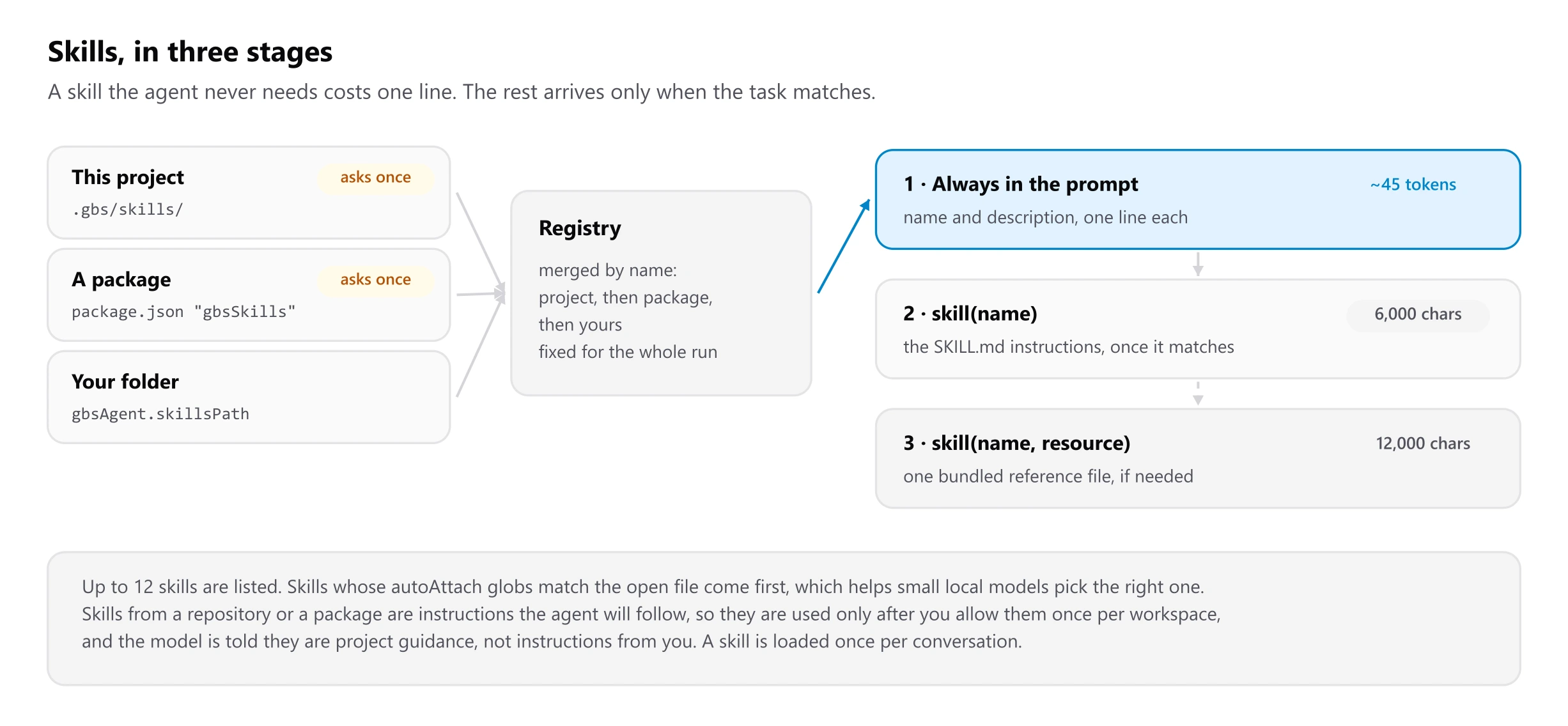
Skills stay cheap because only their name and description are always in the prompt, about 45 tokens each. The instructions load when the agent decides they apply, and bundled reference files load only if the task needs them.
Writing one
Run GBS Agent: New Skill, or create the folder yourself:
.gbs/skills/component-library/
├── SKILL.md            # when to use it, and the rules that matter
└── references/
└── forms.md # detail, loaded only when the task needs it---
name: component-library
description: Builds UI with the GBS component library. Use when adding or changing UI in apps that import @gbs/ui.
autoAttach: ["src/**/*.tsx"]
---
# Component library
- Tables: `DataGrid`, never a raw `<table>`.
- Forms: wrap every input in `FormField`.
- Import from `@gbs/ui`, never from `@gbs/ui/dist/*`.
Details: see references/forms.md- Keep
SKILL.mdunder 500 lines and move the rest into files beside it, so a small task never loads the whole guide. - Write the
descriptionso it says what it covers and when to use it. That one line is how the agent decides to load it. autoAttachglobs mark the skill as relevant for matching files, which helps small local models pick the right one.
Where skills can live
| Location | Use it for | Shared with |
|---|---|---|
.gbs/skills/ (or .claude/skills/) in the project | The project's domain, conventions and requirements | Everyone who clones the repo |
A package that lists "gbsSkills": ["skills/<name>"] in its package.json | A library shipping its own usage guide, versioned with the code | Everyone who installs the package |
Your own folder (GBS Agent: Open Skills Folder, or gbsAgent.skillsPath) | Habits, and company-wide skills for every project | Just you, unless the folder is a shared repo |
If the same name appears twice, the project wins over a package, and a package wins over your folder.
Using them
- The agent loads a skill by itself when the description matches the task; you will see a Skill row in the transcript.
/skillslists what is available, where each came from, and what the catalogue costs per request.- Skills from a repository or a package are instructions the agent will follow, so the first time a workspace offers them you are asked once. GBS Agent: Reload Skills asks again.
- A skill missing its
nameordescriptionis listed as invalid and never sent to the model.
GramproKit ships a skill
npx @grampro/kit skill writes the component library's skill into
.gbs/skills/, where this agent finds it with no other setup. See
Using it with GramproKit.